A worked example, not a client story.
AI for a photography business: running the website
Oleksii Rytov 9 min read
My wife is a photographer in Kraków. She is on maternity leave, and her website still has to work: new articles for search, galleries, enquiries from the contact form. The admin panel is mine to maintain, and it was the thing standing between an idea for an article and the article. So since September the site is run from a chat. The brief goes in as plain Polish, an assistant does the clicks, and one of us reads the result before anything goes live.
This is not a client story. It is our own site, and it runs this way now. Below is what the job looked like before, what the assistant is allowed to do, what it is not, and what it cost.
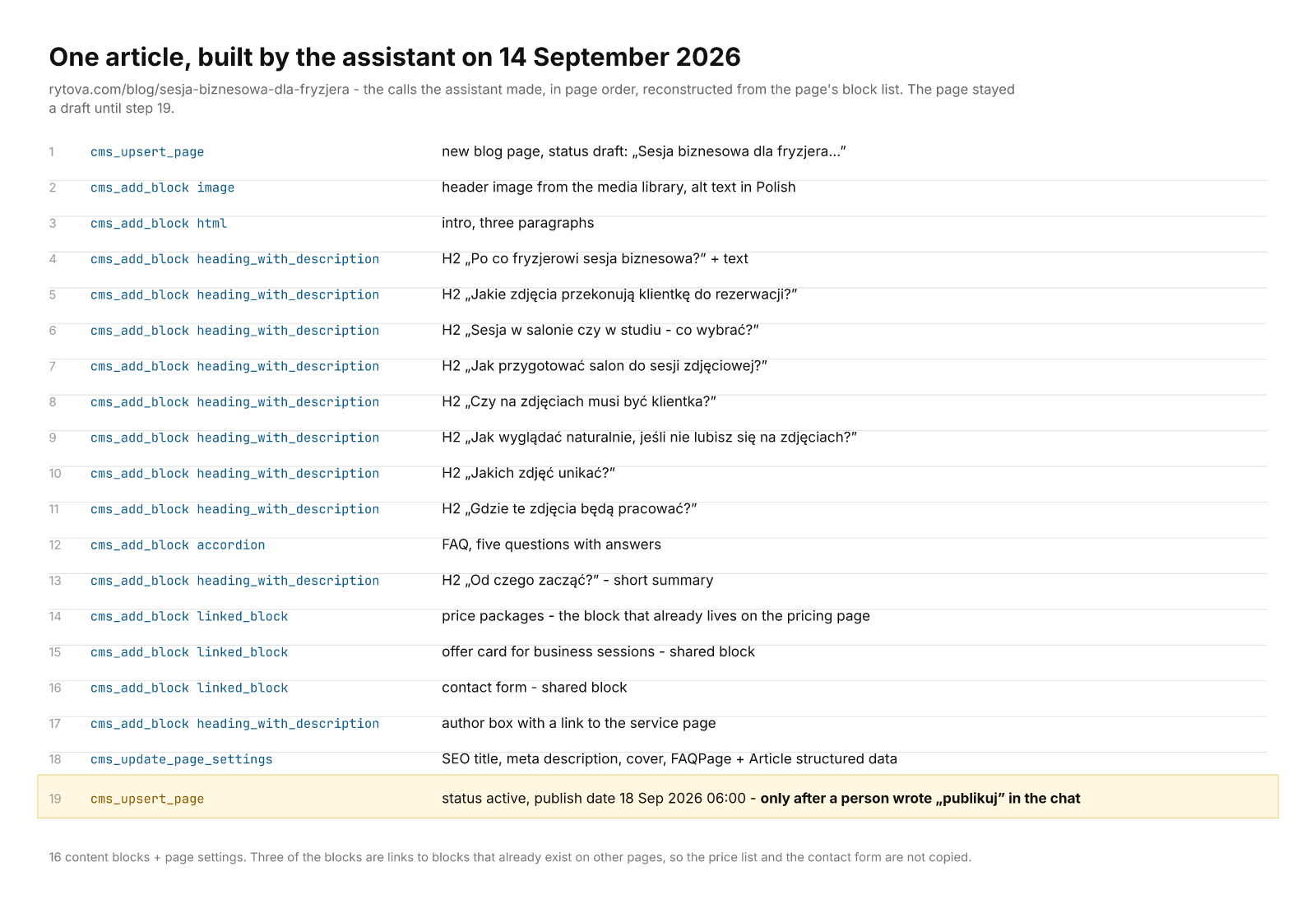
The calls behind one article on 14 September, in page order. I reconstructed the list from the page's blocks, so the order is the page's order, not a log. Step 19 is the only one a person had to ask for.
What running the site looked like before
A blog post on her site is not one text field. It is about fifteen blocks: a header image chosen from the media library, an intro, six to eight sections with an H2 each, an FAQ accordion, a pricing block, an offer card, a contact form, an author box. Each block has its own settings. Then the SEO title and description, the structured data, the publish date.
Writing the Polish text was the smaller part. Putting it into the CMS took an evening, and it had to be me, because I built the CMS and I knew where things were. So it did not happen. The blog had no new article between July 2025 and September 2026. Fourteen months. The dates are on the site, anyone can check them.
Enquiries were the same shape. The contact form writes into a small CRM. Two hundred and something enquiries since August 2024, spam mixed with real people, and most of them never got a status. They were answered, by phone or by email, and then nobody went back into the CRM to write down what happened.
What the assistant does now
Three small servers sit between the assistant and the site. One for the CMS, one for the enquiries, one for the site settings. Each one is a thin layer over the database with a list of things the assistant may do. I wrote about how long they took in a separate note. Not long, and mostly because I work alone.
For an article, the assistant creates the page as a draft, picks a header image from the library, builds the blocks, writes the FAQ, fills the SEO fields and the structured data, and sets a publish date. It also links the pricing block and the contact form that already exist on other pages, so they are not copied. The header images all come from one series of 1200 by 628 covers she made in spring 2025, so the picker has less choice than the library size suggests.
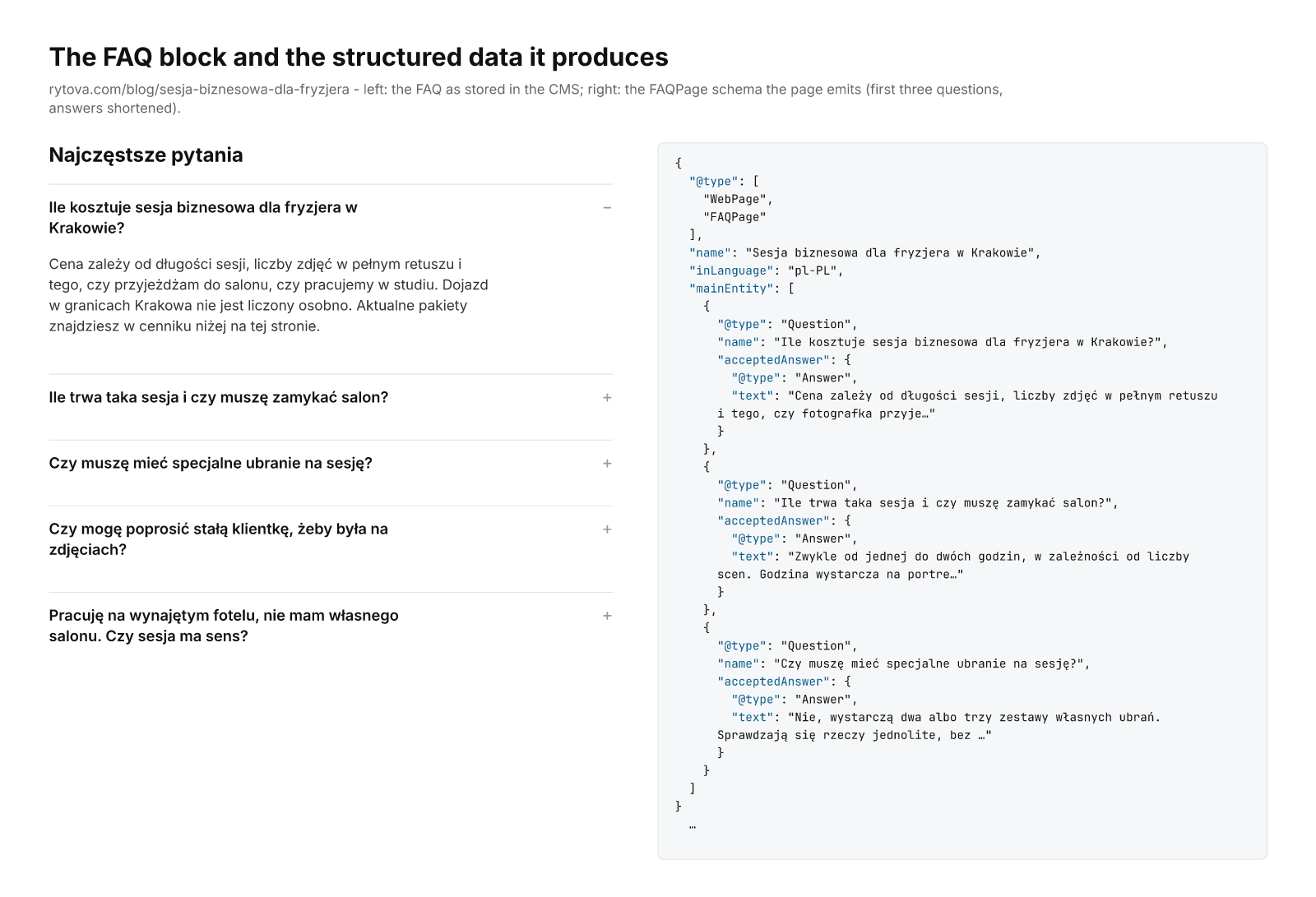
The FAQ block as stored in the CMS, and the FAQPage schema the page emits from it. Same five questions, one source.
The media library is a slower job. The assistant looks at pictures nobody has described and writes a description for each: what is in the frame, how many people, indoor or outdoor, whether it is good enough to show a client. Almost seven hundred pictures were sitting there with only a filename. Twenty-two are described so far. It is slow, and I do it in small batches, because I want to see what it writes.
With enquiries it reads what came in, tells her in one sentence what it is about, and marks it. A real person is kept, or archived when the case is closed. Spam is deleted.
Result so far: four new articles in one week in September, all scheduled on different days, and two old ones updated. Zero in the fourteen months before. That is the only number I have. It says something about output and nothing about hours, because I did not measure the hours before, and I am not going to invent them now for a nicer paragraph.
What the assistant is not allowed to do
This part took longer than the code did.
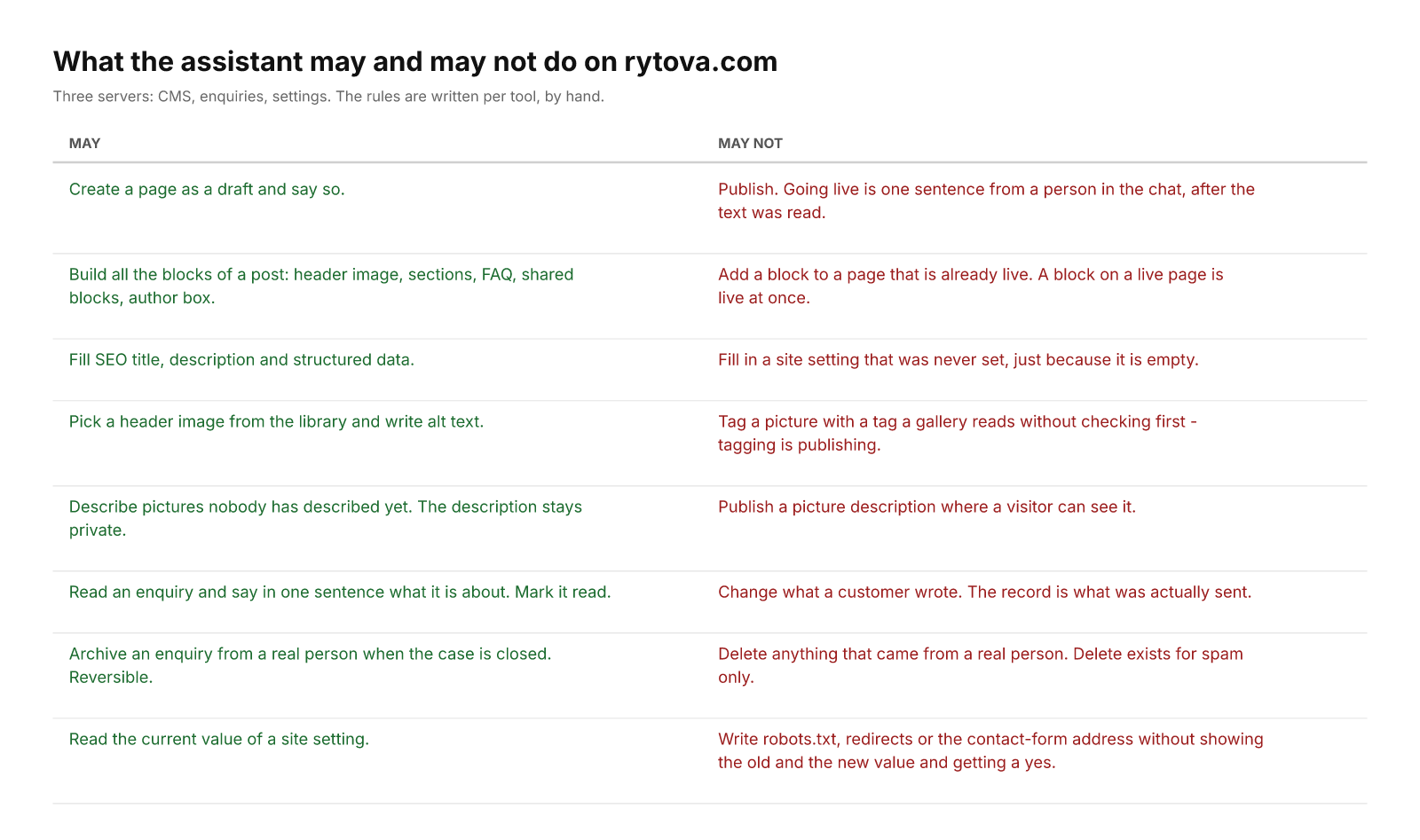
It cannot publish. It creates pages as drafts and says so. Publishing is one sentence from a person in the chat, after the text was read. A block added to a live page is live at once, so the whole page is built as a draft first and published after, never the other way round.
Customer text is read-only for it. An enquiry is what the person actually sent. If the email address has a typo, it stays a typo in the record and gets fixed in the reply, not in the database.
It cannot delete anything that came from a real person. Delete exists for spam only. Everything else is archived, which keeps the record and can be undone. I wrote about why - a wrong delete fails with no error and no trace.
Settings that cost money it may only propose, with the current value and the new one side by side, and I say yes or no. The robots file, the redirects, the address the contact form sends to. A wrong value in any of these keeps the site looking fine and quietly breaks it.
And the gallery rule, which I did not expect to need. A gallery on her site does not hold images. It holds a tag, and shows every picture carrying that tag. So tagging a picture is publishing it. The assistant has to check which tags a gallery reads before it tags anything.
The rules as they stand today. They are written per tool, and this table is the first time I wrote them down in one place.
Where the LLM step is
Most of this is not an LLM problem. Building blocks, setting dates, linking a form - that is code, and it should stay code.
The language model writes the Polish text from the brief, in her voice, and she edits it. It also reads an enquiry and says what it is, and it looks at a picture and describes it. Those are the steps I could not write as rules, and they are also the steps where it is wrong sometimes. I have not counted how often. So the picture descriptions stay private and only help choose a picture, and nothing a visitor sees is written by the model without a person reading it first, which in practice means her, on the phone, usually in the evening.
What it cost
The three servers: a few evenings, inside the ten evenings I estimated for all seven of mine. That number is a guess. I did not track it.
The rules: about an hour per server of deciding what it may never do. Written by hand. They do not transfer to the next server, I start again each time.
Running cost: the Team plan we already pay for and a hosting bill that was there anyway. I have not added it up per article, because the honest answer would be a range so wide it is useless.
What she still does is the brief and the reading, and then the word that publishes. I have not asked her to time it, so I will not put a number here.
What I still do: the archive of enquiries fills with things that should have been deleted, and I clear it out. Late, usually.
What I want to add next
There is a list, and I add to it when something annoys us, not on a schedule.
The media descriptions are the big one. Six hundred and forty-seven pictures left, as of today. When they are done, the assistant can pick a header image by meaning - "a woman in an office, calm, landscape" - instead of by filename.
The enquiries should arrive in the chat by themselves, with the one-sentence summary, instead of her asking. That is a small change and I have not done it because the current way works.
I want the assistant to check a new article against the older ones before it writes, so two posts do not compete for the same search phrase. Right now I do that by hand with a list.
And I want to know, after the fact, that a setting changed. Most small settings have no history, and I do not know yet how to build that without writing down every value before every change, which for three settings is fine and for thirty is not.
When I would not do this
If the site is edited once a year, the admin panel is fine and this is a week of work for nothing.
When the person who owns the site is not going to read what the assistant writes before it goes live. The whole setup depends on her reading. Take the reading out and you have a site that publishes text nobody checked, in a language the builder is not going to proofread.
If the CMS has no API and no database you can reach. Then the "thin layer" is not thin, it is a scraper, and it breaks every time the vendor changes a button.
And if somebody other than me had to maintain it. There is no documentation and there are no tests. That is fine for a site in the family. For a client it would not be, and building it properly is several times the work, most of it the boring kind.
Questions
Can AI run a small business website on its own?
It can do the clicks. On my wife's site the assistant builds a whole article as a draft, including the FAQ, the SEO fields and the structured data. What it cannot do is publish. A person reads the text and says the word, and that is the part I would not remove.
What does the assistant need to connect to the website?
A way into the CMS that is not the admin panel. In our case three small MCP servers over the site's own database: one for pages and media, one for enquiries, one for settings. If a CMS has no API and no reachable database, the layer becomes a scraper and breaks often.
How do you stop it from deleting or changing the wrong thing?
By not giving it the tool. Delete exists for spam only; everything from a real person is archived, which can be undone. Customer text is read-only. Settings that cost money, like the address the contact form sends to, it may only propose, with the old and new value side by side.
How long did it take to set up?
The three servers took a few evenings, as a guess, not a measurement. Writing down what the assistant may never do took about an hour per server and is the part I redo for every new one.
Does the AI write the Polish articles?
It writes a first version from the brief, in her voice. She edits it before it goes live. The model also summarises enquiries and describes pictures in the media library, and those descriptions stay private because they are sometimes wrong.